Kubernetes end of life: EKS, GKE and AKS dates
Kubernetes end of life dates differ by cloud. Compare EKS, GKE and AKS deadlines, Kapsule and OVHcloud policies, and the cost of extended support.
- Author
- The Log’in Line team
- Published
- Topics
- KubernetesInfrastructureFinOps
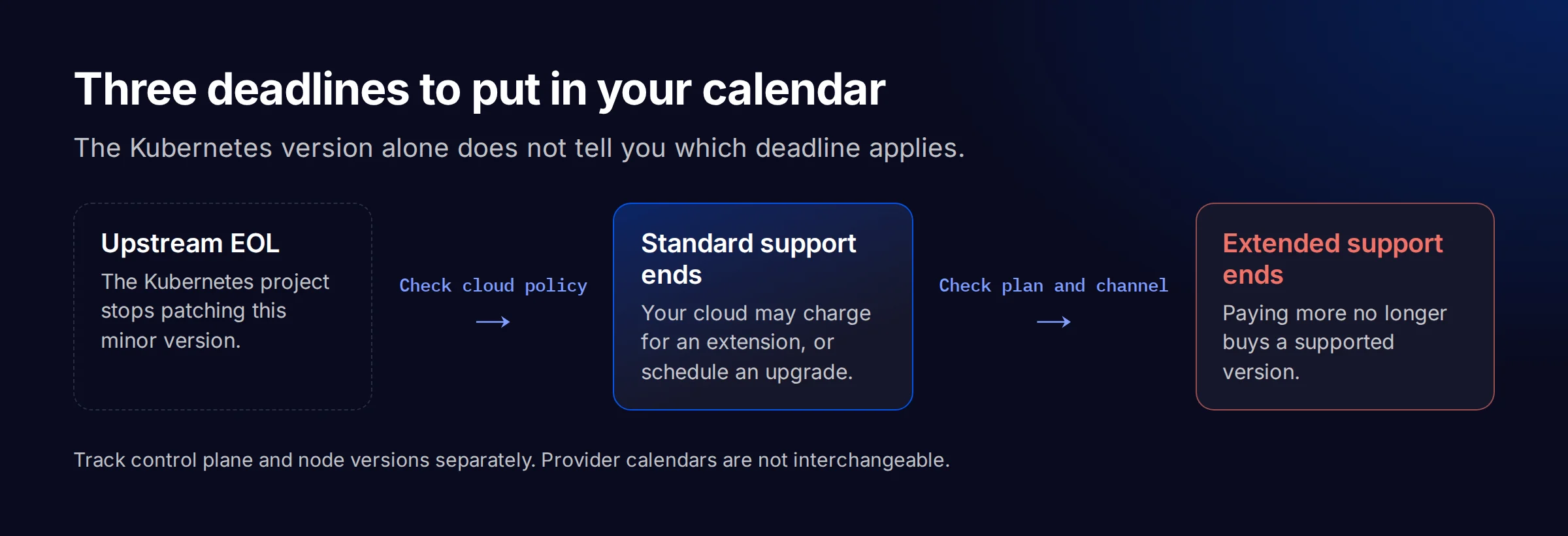
Kubernetes end of life means the upstream project stops maintaining a minor version. Your managed cluster can still receive provider support after that date, sometimes at a higher price. On November 5, 2026, Kubernetes 1.34 is already upstream EOL, but EKS standard support continues until December 2 and GKE standard support until January 25, 2027. Those are different deadlines. Track the one your cluster actually follows before choosing an upgrade target.
End of support dates by Kubernetes version
| Minor version | Upstream EOL | EKS standard / extended ends | GKE standard / extended ends | AKS standard / LTS ends | Kapsule support ends | OVHcloud MKS |
|---|---|---|---|---|---|---|
| 1.31 | 2025-11-11 | 2025-11-26 / 2026-11-26 | 2026-01-16 / 2026-10-22 | 2025-11-01 / 2026-11 | Not listed | Rolling policy |
| 1.32 | 2026-02-28 | 2026-03-23 / 2027-03-23 | 2026-04-27 / 2027-02-11 | 2026-03 / 2027-03 | Not listed | Rolling policy |
| 1.33 | 2026-06-28 | 2026-07-29 / 2027-07-29 | 2026-08-12 / 2027-06-12 | 2026-07 / 2027-07 | 2026-11-04 | Rolling policy |
| 1.34 | 2026-10-27 | 2026-12-02 / 2027-12-02 | 2027-01-25 / 2027-11-25 | 2026-11 / 2027-11 | 2026-11-29 | Rolling policy |
| 1.35 | 2027-02-28 | 2027-03-27 / 2028-03-27 | 2027-04-11 / 2028-02-11 | 2027-03 / 2028-03 | 2027-03-19 | Rolling policy |
| 1.36 | 2027-06-28 | 2027-08-02 / 2028-08-02 | 2027-08-09 / 2028-06-09 | 2027-06 / 2028-06 | 2027-09-07 | Rolling policy |
| 1.37 | 2027-10-28 | 2027-12-01 / 2028-12-01 | 2027-12-22 / 2028-10-22 | 2027-10 / 2028-10 | 2027-10-28 | Rolling policy |
Method: this is a snapshot of published calendars, not a live inventory of versions available in every region. Dates come from Kubernetes' official active schedule and EOL history, the EKS lifecycle table, the GKE release schedule, and the AKS support calendar. All were checked on November 5, 2026. Future dates can change. EKS dates use UTC; AKS month-only entries mean the last day of that month unless Microsoft gives an explicit date. Regional rollout can differ.
Kapsule dates come from Scaleway's version support policy. “Not listed” means absent from that calendar, not supported indefinitely. OVHcloud's rolling policy is explained below; no dated per-minor calendar was established from the documentation consulted. For versions older than 1.31, check the provider directly rather than extrapolating backwards.
Several deadlines fall this month. EKS 1.31 extended support ends on November 26, 2026. After that, AWS can upgrade the control plane; it does not promise the exact intervention time. Kapsule 1.33's deadline was November 4, and 1.34 follows on November 29. GKE 1.31's published extended-support deadline has already passed. On AKS, 1.31 LTS and 1.34 standard support both reach their published end in November. Check which support plan you bought before treating those rows as equivalent.
What Kapsule and OVHcloud publish instead
Kapsule publishes end-of-support dates; OVHcloud describes a rolling policy. Neither should inherit the upstream column by default.
Scaleway separates deprecation, when a version disappears from cluster creation, from end of support. Its policy gives a 14-month support window and says unsupported clusters move to the latest patch of the next supported minor version within 30 days, with a ticket notification. Enabling patch auto-upgrades does not remove the need to plan minor upgrades. We found no separately priced extended-support entitlement in this policy.
Scaleway's table gives upstream dates for 1.34 and 1.35 that differ from Kubernetes' own schedule. Our upstream column uses Kubernetes' data; our Kapsule column uses Scaleway's “End of Support” column. Keep those sources separate when you reuse the table, and confirm an approaching deadline in your provider ticket.
The OVHcloud EOS/EOL policy, dated May 30, 2022, describes a forced minor upgrade for the third-oldest unsupported version, or service deactivation if the upgrade fails, after 30 days' email notice. It also reserves emergency action for security risks. Do not turn this old page's historic upstream cadence into a current support duration. Confirm the version list and the notice for your service; we did not establish a priced extension or per-version date.
If you are deciding between providers, ask for the same evidence from each: current version availability, security-fix coverage, and the notice before a forced upgrade. Our Kubernetes managed services page describes what we take over on the operations side. The cloud provider's support policy still applies.
What delaying an upgrade costs
EKS and GKE both publish an extra $0.50 per cluster-hour during the extended-support period. Check the activation rules. An identical hourly total can produce a different bill when one provider starts charging by default and another requires you to enroll in a specific release channel.
| Service | Public cluster-management rate | When the higher fee applies |
|---|---|---|
| EKS | $0.10/h standard; $0.60/h extended | After standard support ends, if the cluster follows the default EXTENDED policy |
| GKE | $0.10/h base plus $0.50/h extended | In the Extended release channel, once the minor version enters extended support |
| AKS | Premium tier required for LTS | Premium billing starts when you select that tier; confirm the current Azure quote |
| Kapsule / OVHcloud | No extended-support rate established in this review | Do not budget a paid extension without provider confirmation |
These are public USD cluster-management rates checked on November 5, 2026, from EKS pricing and GKE pricing, not regional node-price quotes. Nodes, storage and networking remain separate. GKE credits and contract discounts can change your net bill; the table does not calculate them. AKS LTS requires both Premium and an explicit LTS support plan.
Using 730 hours as a budgeting month, one EKS or GKE cluster in the extra-fee period adds 730 × $0.50 = $365. Three such clusters add $1,095. These are arithmetic examples, not invoices or an estimate of migration effort. A small staging cluster incurs the same support surcharge as a large production cluster because this fee is per cluster, not per node.
Paying for an extension can buy time to test a difficult upgrade, but your ingress controller, Helm charts and application dependencies keep their own support deadlines regardless of the cloud's fee. Assign an owner. Agree on a target date too, or the same work remains waiting when the final deadline arrives.
Check the cluster, its nodes and its support plan
An inventory needs the server version, the node versions and the cloud's support setting. A developer laptop's kubectl version tells you none of those on its own.
These read-only examples use kubectl's JSON interface and AWS CLI v2, Google Cloud CLI or Azure CLI. They require an authenticated account with permission to read the target cluster. Replace the uppercase values and confirm your Kubernetes context first; these commands do not trigger an upgrade.
kubectl config current-context
kubectl version -o json
kubectl get nodes -o custom-columns='NAME:.metadata.name,KUBELET:.status.nodeInfo.kubeletVersion,RUNTIME:.status.nodeInfo.containerRuntimeVersion'

aws eks describe-cluster --name CLUSTER --region REGION \
  --query 'cluster.{version:version,support:upgradePolicy.supportType}'

gcloud container clusters describe CLUSTER --location LOCATION \
  --format='yaml(currentMasterVersion,currentNodeVersion,releaseChannel.channel)'

az aks show --resource-group RESOURCE_GROUP --name CLUSTER \
  --query '{version:kubernetesVersion,tier:sku.tier,supportPlan:supportPlan}'
Record the region and cluster identifier beside the applicable deadline. On GKE, record the release channel; on AKS, record the support plan as well as the tier. For Kapsule and OVHcloud, attach the provider's notification or written confirmation to the inventory. Keep Kubernetes end of life dates beside the provider deadlines so the team can see which one triggers the work.
Check runtime and API compatibility before choosing a target
The support table tells you when to move. It cannot tell you whether your workloads survive the move. Review the target version's release notes and your provider's node-image changes before scheduling production.
Containerd is one example where the cloud-specific detail matters. GKE's containerd 2 migration guide places the Linux transition at GKE 1.33 and the Windows Server transition at 1.35. Do not treat “containerd 2 at 1.36” as the first date your managed nodes can be affected. Check the actual runtime in the inventory, including private-registry configuration and integrations that use containerd directly.
Check cgroup compatibility against the target node image too. Then review removed APIs, admission webhooks and add-on compatibility. A quiet staging cluster may not exercise a scheduled job or an operator that only reconciles occasionally. Replaying representative traffic and running those jobs gives you more evidence than a green deployment alone.
Put a quarterly upgrade review on the calendar
A quarterly review is a planning recommendation, not a guarantee that every provider releases on your schedule. Use it to pick a supported target with enough runway, test it in staging and reserve the production window before support pricing changes.
Start with clusters closest to the end of their final support period. Next, group clusters that share node images and add-ons, so one tested change can inform the others. Keep a separate task for node pools: a supported control plane does not prove that every worker or operator is current. Do not assume an in-place downgrade is available; establish the recovery procedure before the change.
Keep the inventory, its sources and its last verification date together. If the upgrade has no owner in your team, bring the versions and deadlines to a free 30-minute diagnostic. We can help define the catch-up work without pretending that paying the cloud's support fee does it for you.
About the author
The Log’in Line team